 Vminer
Internet café mining · Netbar mode
Internet café mining software: idle GPUs mine, games take them back instantly
Built for internet cafés, diskless systems, labs and idle office PCs.
- Native Windows
- Diskless-ready
- No extra fees — only the kernel's 2%
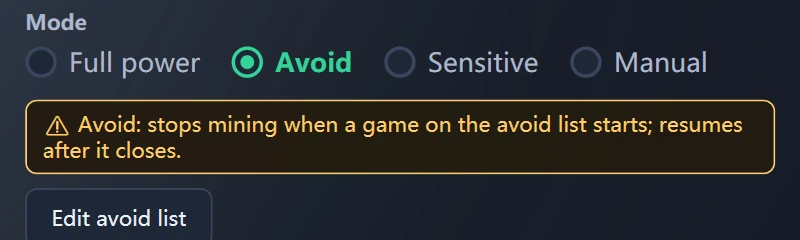
Four ways to yield — pick one per venue
Diskless internet café mining in three steps
- Set up one machineEnter the wallet, pick a pool, turn on Netbar mode and choose a yield mode. A master PC without a GPU works too.
- Put the Vminer folder in the master imageWallet, pool, kernel and mode all live in the client folder — install once, cover every seat.
- Every seat mines on bootKeep Vminer running on the master image and it updates itself; client PCs boot the latest version.
Built for internet café mining
Internet café GPU hashrate
FAQ
Will internet café mining make customers' games lag?
No. In Avoid mode the GPU is handed over the moment a listed game starts; in Sensitive mode it yields as soon as someone uses the PC or the GPU gets busy. With auto power on, power returns to 100% while yielding.
Which mode should an internet café use?
Full power: always mines, for pure rigs with no users. Avoid: yields when a listed program starts, for a fixed game set. Sensitive: yields whenever someone uses the PC or the GPU gets busy — the easiest choice for most internet cafés. Manual: stays idle on boot until you wake it from Fleet Control or locally.
Does mining stop when customers watch videos?
Depends on the mode: Avoid only watches the program list, so browser video keeps mining; Sensitive yields if someone's using the PC or the video pushes GPU load up.
What if a customer closes Vminer?
In Netbar mode Vminer restarts itself.
How do I deploy on a diskless system?
Set up one machine → put the whole Vminer folder into the master image → every PC is ready on boot. Keep the master image running and it updates itself, so client PCs boot the latest version.
Diskless PCs lose settings after reboot — how do I update them all?
Client PCs restore to the master image on every boot, so the master is the source of settings and version. Configure it there, keep Vminer running on the master so it updates itself, then clone.
Can Netbar mode and overclocking run together?
No, pick one. Netbar mode has its own auto power limit.
Is internet café GPU mining worth it?
It depends on the GPU and your electricity price. Measured hashrate, power and estimated daily earnings per model are in the GPU hashrate table.
Is Vminer free?
Vminer is free to download. No extra fees — Vminer only takes the kernel's 2%.